
|
❝
Quick Answer: The choice between Adobe Express vs Canva is based on your workflow, budget, and creative objectives. Canva is better suited for novices, teams, templates, and AI-powered content creation. In contrast, Adobe Express is excellent for Adobe ecosystem customers who want stronger branding, professional resources, and faster creative workflows. Both technologies provide great support for social media, marketing, and business design initiatives. ❞
|
Introduction
The Adobe Express vs Canva differences debate seems obvious until you’re three hours into a design you can’t complete the way you wanted.
You choose a tool, begin designing, and figure the hardest part was the design itself. Then your limitations discovered you. A feature that is not available for free. A template that nearly works. An export that does not seem as it appeared on screen.
Here’s the truth that no one tells you: both Canva vs Adobe Express tools are actually remarkable, as well as both can annoy you in unexpected ways if you choose them without the proper knowledge.
The true question never was “which one looks more appealing in a YouTube thumbnail.” It was always about determining which one is the greatest fit for your working style, what you generate, and your budget.
So, keep reading and exploring to reveal the truth of which is better: Canva vs. Adobe Express and much more.
Adobe Express vs Canva: Quick Comparison
Before we deep dive into the Canva vs Adobe Express comparison, let’s look at the quick comparison table to have a basic idea about what both tools possess:
| Factor | Adobe Express | Canva | Winner |
|---|---|---|---|
| Ease of Use | Clean and beginner-friendly interface | Extremely intuitive and beginner-friendly | Canva |
| Templates | Curated and brand-focused templates | Huge template variety for all use cases | Canva |
| Photo & Video Editing | Strong Adobe-powered editing tools | Excellent editing with more stock assets | Adobe Express |
| AI Features | Adobe Firefly AI tools | Canva Magic Studio with broader AI tools | Canva |
| Export Options | Standard formats like PNG, JPG, PDF, MP4 | More export options including PPTX and CSV | Canva |
| Brand Management | Better Adobe ecosystem integration | Good but less advanced for branding | Adobe Express |
| Collaboration | Suitable for creative teams | Strong real-time collaboration tools | Canva |
| Customer Support | Phone, email, live chat, social support | Mostly email support | Adobe Express |
| Pricing | More affordable premium plan ($9.99/month) | Higher pricing ($15/month Pro) | Adobe Express |
| Best For | Professional branding and Adobe users | Fast content creation and social media | Depends on needs |
Adobe Express vs Canva: Detailed Comparison
Here are the detailed Adobe Express vs Canva differences:
1. Interface
Usability is critical in app design. If you’re having trouble accessing the app’s basic operations, features, and tools, it might exacerbate the learning curve. That’s why I believe simplicity is key. How soon can we explore and start creating in any of these applications? Let us find out.
Adobe Express
- Quick menu. From the homescreen, you may go directly into creating.
- Content search. Enter what you want to create, explore templates, or find your files.
User-friendly. As a new user, you may easily navigate and create in the app.
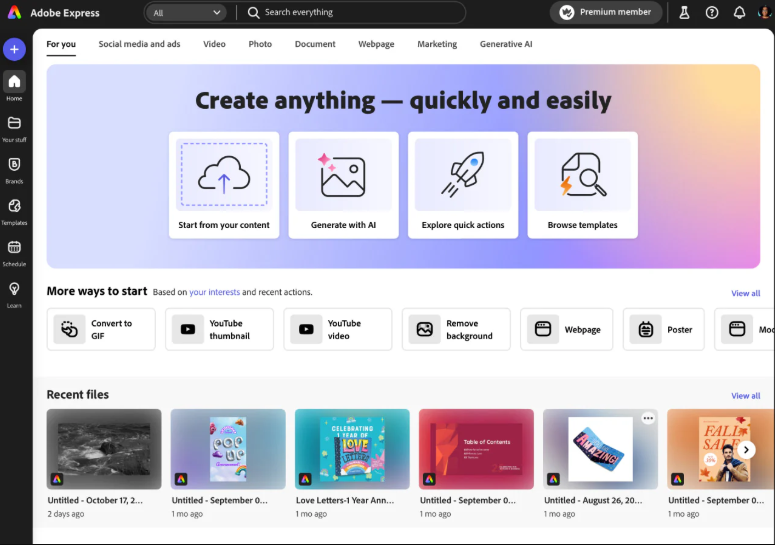
When you initially use the app, you’ll see useful Quick Actions for uploading documents, turning MP4s to GIFs, and more.
As you scroll down, several attractive templates will appear at the bottom of the homescreen. These pre-designed templates allow you to jumpstart your design without having to start from scratch.
The Home, Your Stuff, Learn, and Add-ons icons are located on the side of the homescreen. Popular classifications and formats, such as social media and advertisements, video, photo, and more, appear at the top of the screen like Adobe Analytics.
When you click on any of the suggested activities or templates, you will be sent directly to the design editor, where you can begin designing. Let’s discuss about Canva in this Adobe Express vs Canva interface difference.
Canva
- The design is clean. The homescreen is easy to navigate.
- Content search. Enter what you want to create, explore templates, or find your files.
- User-friendly. As a new user, you may easily navigate and create in the app.
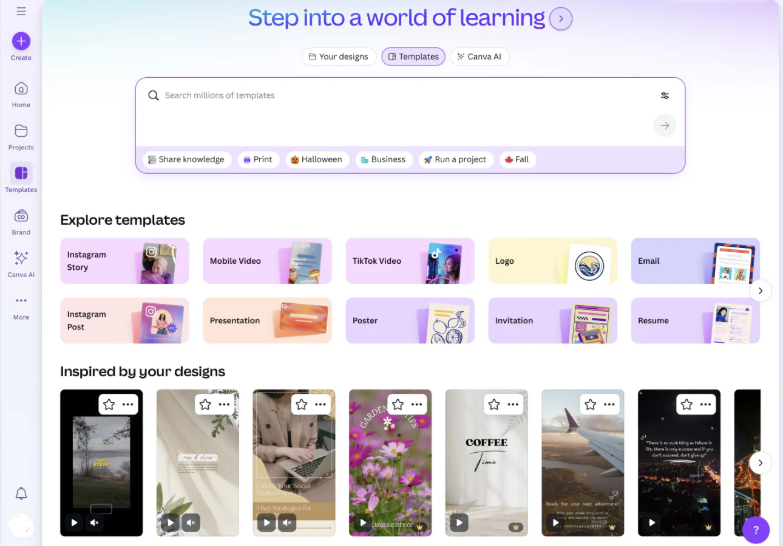
Canva includes a huge search bar at the top of the homescreen that allows you to search for anything you need.
When you pick your designs, Templates, and Canva AI, the search box will change to reflect each.
Use Your user interface designs to search through your papers, folders, and uploaded files. The Templates area allows users to search through millions of templates.
Canva AI allows you to put a description of what you’re looking for into the search field, and it will help you bring it to life.
Winner: Tie
1. Better Templates
Between Adobe Express vs Canva Pro, Canva offers more templates and diversity, making it the superior choice if speed and coverage are most important. Adobe Express provides a more tailored setting, which makes sense when brand management and professional handoff are more important than infinite options.
Adobe Express
Adobe Express has a smaller template world, but it feels more organized. The best way to look at it is not quantity vs quantity. It is actually quantity vs curation. Express is more suited for organizations that want templates to stay on-brand, particularly when materials are arriving from Adobe Photoshop or Illustrator while being handed off for minor tweaking. That bridge is important.
Adobe’s ecosystem provides more long-term professional value.
If Canva templates are wonderful for getting things done quickly, Adobe Express templates seem more like a pipeline that can expand into stricter brand systems and more custom work. This makes them more brand and use-case-specific, rather than universally beneficial.
Canva
Canva wins due to the large number of users it has. Almost everything has a template that you can use, such as social media posts, lesson plans, posters, pitch decks, meals, and invitations.
That is one of the reasons Canva works so effectively for small companies, schools, and solo designers. You seldom start from scratch, which is important for short-term projects.
However, if you are already bored with making decisions, having additional alternatives might be a problem in and of itself. Canva’s template collection may be loud, and quality varies after the first few rows. This is generally sufficient for fast social media updates. Cracks appear in more sophisticated brand work.
Winner: Canva
2. Photo and Video Editing
Adobe Express vs Canva both have drag-and-drop editors, as well as basic picture and video editing features.
Both platforms allow you to make common edits to films and photographs, such as filling in the background in images, eliminating an image, resizing videos, and so on.
Adobe Express even allows you to accomplish some of these tasks with a single click from your dashboard.
Both programs provide access to a variety of filters and effects, and they may change certain portions of an image for you.
Notably, Canva does not provide background removal on its free plan. Adobe does provide background removal and can even flip cuts, allowing you to eliminate the photo topic rather than the backdrop, which is useful.
When it comes to the video editing, Adobe Express provides a variety of formats to let you generate videos for various reasons, like TikTok and Instagram AI.
Canva provides a similar experience and includes a useful “Beat Sync” feature to let you alter the music in your content.
Winner: Adobe Express
3. Exporting and Platform Compatibility
When deciding which Adobe Express vs Canva applications to use, consider where and how they are supported. What’s the purpose if you can’t utilize it with the gadgets you already have and enjoy?
Let’s look at how to store your work and where you may use each of these applications.
Adobe Express
Express supports exporting to the following formats:
- PNG
- JPG
- PDF Standard
- PDF Print
- MP4
- GIF
While these are common formats, free users face certain export constraints. Express does not provide free quality modifications for file or PNG outputs with translucent backgrounds.
It might be annoying not to have access to transparent PNGs, especially while working on projects such as websites, developing applications, photo collages, and so on.
Canva
Canva supports exporting to the following formats:
- JPG
- PNG
- PDF Standard
- PDF Print
- SVG (Premium Plans)
- MP4
- GIF
- PPTX
- CSV
- XLSV
It’s fantastic to see that this list includes export to Microsoft products like PowerPoint and Excel.
It makes it easy to use your files outside of the Canva app while maintaining your work and animations intact. Free users, like Express, are unable to alter export quality or export transparent PNGs.
Canva, like Express, provides printing through a third party. You may print your work on a number of surfaces, such as mouse pads, envelopes, tote bags, banners, and more. It’s fantastic to see printing integrations that allow users to widen their perspectives on their own work.
Winner: Canva
Humans and AI: 11 top best Impacts of AI on Society and how humans evolve together with It
4. Pricing
Adobe Express vs Canva offers a variety of membership plans with differing functionality. Both platforms provide a free plan with fewer functionalities than their premium ones. Both offer a paid subscription, although the cost varies.
Canva pricing
Canva has four tiers: free, pro ($15/month), business ($20/month per person, temporarily discounted), and enterprise (contact sales).
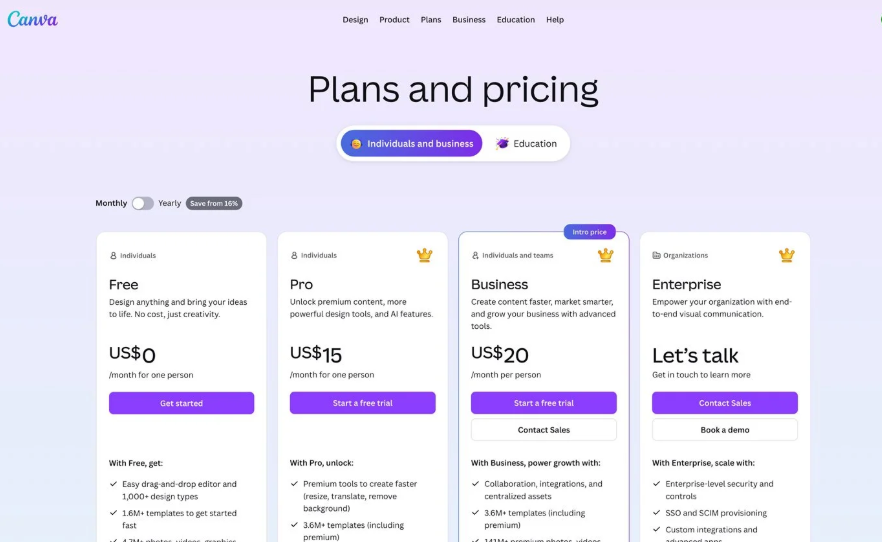
Canva Free has more than 1.6 million templates ,plus the main editor. Pro membership gives access to premium templates, the background remover, and a bunch of other AI functions. Business, though, adds teamwork features ,plus integrations and centralized asset storage.
Adobe Express Pricing
Adobe Express has three pricing tiers: free, premium ($9.99/month), and Firefly Pro ($19.99/month).
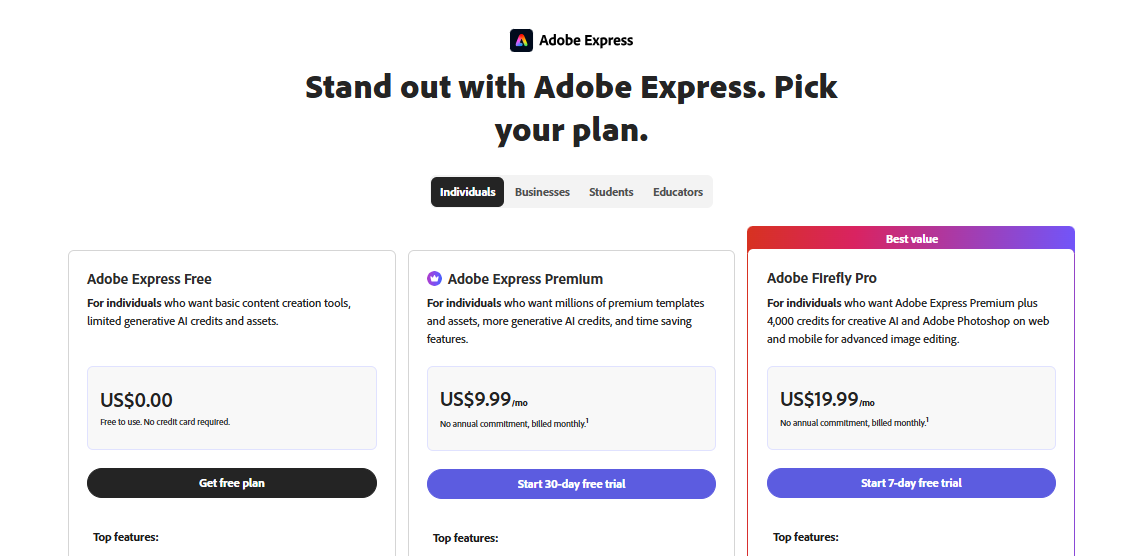
Express Free has 100,000+ templates, 1 million+ Adobe Stock assets, and 4,000+ typefaces. Premium unlocks all templates, over 200 million assets, 250 generative AI tokens each month, and time-saving tools. Firefly Pro includes 4,000 monthly credits for AI video and audio, as well as limitless Generative Fill in Photoshop on the web and mobile.
Express Premium has no yearly commitment and is invoiced monthly. When compared to Canva Pro, the difference between $9.99 and $15 saves you around 33%.
Winner: Adobe Express
1. Customer Support
While Canva is more user-friendly overall, Adobe Express provides greater customer service. Both platforms provide users with a wealth of self-help tools, such as tutorials, FAQs, videos, and instructions, which we like.
However, you may contact Adobe by phone, live chat, email, and social media.
Canva offers only email assistance, and replies might take up to a week if you’re on the free plan.
If you subscribe to a subscription plan, you may anticipate replies within 24 hours, which seems a little lengthy when dealing with a severe web design issue.
Winner: Canva
2. AI Tools
As previously stated, both Adobe Express vs Canva now provide generative AI tools.
Adobe now offers four AI features: text to picture, generative fill, text to template, and text effects.
Essentially, all of these tools let you take advantage of the Adobe Firefly platform to develop materials for your business.
All of these capabilities are excellent, but Canva’s AI tools are much more powerful.
Canva Magic Studio provides access to AI technologies for developing a wide variety of templates and materials.
You can create photos from scratch with Dall-E and Google’s software.
Winner: Canva
3. Organization And File Management
The only way to make your work easier to find is to keep it organized. This generally entails constructing a folder system.
Both Express and Canva provide users with this functionality, as well as a few other useful features that make it easier to find your files when you need them.
Adobe Express
- Keep your project files organized.
- Search for files by their names. Use the search bar to find your files, folders, and projects.
- Cloud storage. Never lose a file while moving between devices.
You may arrange your work into folders, projects, or libraries under the Your Stuff area. Folders may be formed, and files can be conveniently dragged, dropped, or saved into them.
Projects are a shared workspace where you can keep your files, branding, and libraries organized for quick access. Libraries are where your CC Libraries will be stored and made available to you in Express while comparing Adobe Express vs Canva.
Canva
- Keep your project files organized.
- Search for files by their names. Use the search bar to find your files, folders, and projects.
- Cloud storage. Never lose a file while moving between devices.
Canva divides your work into three categories on the Projects tab: Folders, Designs, and Images. Your Folders are meant to help you organize your files and folders. Your Designs are any unique files that you have generated in Canva.
You may either create them from scratch or look for templates to customize. The Images area contains all of the materials you have ever uploaded to Canva. You may also upload photographs from Google Drive, OneDrive, and Dropbox.
Winner: Canva
Which Is Better: Canva Vs. Adobe Express
Here are the scenarios in which both Adobe Express vs Canva tools have advantages over each other:
Advantages of Using Adobe Express Over Canva
- Adobe Express is significantly cheaper than Canva, particularly for team seats.
- It allows you to export unfastened PDFs.
- Adobe Express provides phone and live chat assistance, whereas Canva just provides a (hard-to-access) contact form.
- It has a far wider choice of typefaces than Canva.
- It provides more royalty-free photos than Canva (but there are additional limits on how you may use them).
- It allows you to work with an infinite number of brand kits.
- It gives additional storage at the team level.
- Its AI-powered picture generator is more adaptable and, in my experience, produces higher-quality results.
- If you currently use Adobe products, you will like how Adobe Express works with the company’s larger ecosystem.
Advantages of Using Canva Over Adobe Express
- Canva has various more tools that are not available in Adobe Express, such as a whiteboard builder, document creator, and product mockup generator.
- It provides access to a broader set of AI tools, including a text-to-video production tool.
- It offers substantially more templates than Adobe Express.
- It’s a far better tool for team cooperation.
- The video editor is more powerful.
- Its licensing rules for stock pictures are more liberal.
- It offers more export choices (but not unflattened PDFs).
Conclusion
Overall, Adobe Express vs Canva are great web-based creative tools. However, after trying both, we believe Canva is the best alternative, especially for small teams. It provides additional templates, innovative AI capabilities, and greater value for money.
Canva is an excellent tool for enthusiasts who cannot afford contractors or who want to unleash their creative potential. Professionals looking to save subscription costs without sacrificing quality may love Canva’s features, but they will most likely require a Canva Pro membership to get the most out of them.
Frequently Asked Questions
Your workflow and creative experience will strongly influence whether Canva Pro is better than Adobe Express. In general, Canva is the superior all-in-one platform for novices and teams, whereas Adobe Express is better suited to experienced Adobe customers
Canva’s main and most direct rival is Adobe Express. It’s a user-friendly alternative to Canva that makes use of Adobe’s vast asset collection and professional programs like Photoshop.
No, you do not need a paid Adobe subscription to utilize Adobe Express.
Canva and Adobe Express both employ AI to automate and speed up the creative process. While Canva depends on a wide, conversational AI assistant and a variety of third-party models, Express uses Adobe’s exclusive Firefly generative AI for high-quality, professionally safe photography.
